
Your store is working. Revenue is steady, the product catalogue has grown to a few hundred items on WooCommerce or Shopify, and paid ads are pulling well enough to keep the pipeline moving. But organic traffic has been flat for six months.
Your cost-per-acquisition on paid is creeping upwards. And someone has just suggested getting an SEO audit.
The problem is, you've had audits before. What came back was a 50-item spreadsheet full of amber flags, the most alarming of which turned out to be a missing H1 tag on three discontinued product pages.
Not exactly the insight that changes a business.
Sound familiar?
An ecommerce site is not a bigger version of a brochure website. A catalogue with 400 products and faceted filter navigation can easily generate 40,000 URLs, and most of them are working against you. A generic technical audit won't find this.
An ecommerce-specific audit is designed to.
What follows covers the five structural areas where most stores leave the most organic traffic on the table: crawlability and crawl budget, category pages, duplicate content, schema markup, and how to prioritise what the audit actually finds. These are the checks that matter before you scale.
Why ecommerce SEO audits are different from standard ones
A standard site audit looks at title tags, meta descriptions, broken links, Core Web Vitals, and redirect chains. These checks are worthwhile. They're also the same checks you'd run on a 12-page accountant's website.
An ecommerce site generates structural complexity that a generic audit doesn't address. Not because the auditor is cutting corners, but because the problems are categorically different.
Three failure modes show up consistently across ecommerce stores and don't appear on most standard audit checklists.
Crawl budget dilution. Google allocates a fixed number of pages it will crawl from any given site each day. For a small brochure site, this is irrelevant. For a store with 800 products and filter navigation, it's the single most consequential structural question. If Google spends its crawl allocation on filter combination URLs that nobody searches for, it may never reach the category pages that could be ranking for high-volume commercial queries.
That matters more than most store owners realise.
Content duplication at scale. Not plagiarism. The structural kind: product variants sharing identical descriptions, manufacturer copy used across dozens of product listings, paginated category results creating near-identical pages. Each pattern quietly dilutes the store's authority over time.
Category page neglect. Most store owners invest editorial effort in product pages. Category pages are where organic search opportunity is actually concentrated. The audit finds this gap almost every time.
These three failure modes are the lens through which an ecommerce audit should be run. The sections below cover each one, with the specific checks involved and what the output should look like in practice.
Crawlability and crawl budget

Google doesn't crawl everything. That's the starting point.
Every website gets an allocation based on its size, its page load speed, and the strength of its link profile. Google uses this allocation to discover and re-crawl pages. For a fast, well-linked site, the allocation is generous. For a slow or poorly-linked one, it's tighter.
For an ecommerce store with faceted filter navigation, the allocation can run out long before Google reaches the pages you actually want ranking.
Faceted navigation is the primary culprit. Take a store with 15 product categories and eight filter types: colour, size, material, price range, brand, availability, rating, and delivery speed. Each filter combination creates a new URL. Run the maths: even with modest filter counts you can generate tens of thousands of URL combinations. A larger store with more filters can generate hundreds of thousands.
Nearly all of those combinations have no independent search demand. "Women's blue shirts, size 8, under £25, free delivery, four stars and above" is not a query anyone types into Google.
Google crawls many of these URLs anyway. It finds near-identical content each time. It moves on without indexing the pages that should be ranking, because its allocation has been spent on filter combinations nobody will ever search for. Meanwhile, your category pages — which could rank for genuinely valuable commercial queries — may not be getting crawled at all.
Here's why that's a problem.
Google Search Central's own guidance on crawl budget is unambiguous: pages with no independent search value should not consume crawl allocation. The practical tools are robots.txt rules, noindex directives, and canonical tags, applied strategically to faceted parameter URLs.
What the crawlability audit checks:
Robots.txt. What is being blocked from crawling? Are high-value category and product pages inadvertently excluded? And are filter combination URLs explicitly disallowed where they should be? These two problems can exist simultaneously on the same store, and both are common.
Noindex directives on faceted parameters. Are filter pages being told not to index? For most WooCommerce and Shopify stores, URLs like /shop/?colour=blue&size=xs&price_max=30 should carry a noindex directive. They have no search demand and should not appear in Google's index at all.
Canonical tags on paginated pages. Page 2 and page 3 of a category listing are near-duplicates of page 1. Without a canonical tag pointing back to page 1, you've created content duplication and crawl waste in one move. The audit checks both issues for each paginated series.
Internal link distribution. Google discovers pages through internal links. If your faceted navigation generates three hundred internal links to filter combination URLs and your top category pages receive five internal links each, Google reads the filter pages as more important. That's the wrong signal. Correcting internal link distribution is part of the crawl budget fix, not a separate concern.
The practical rule: only URLs with genuine, standalone search demand should consume crawl allocation. The audit maps the gap between the URLs your store is generating and the ones that have actual ranking potential.
Category pages — the most under-used pages on most stores

Most ecommerce store owners spend their SEO effort on product pages. This is the wrong priority.
Wrong, almost universally.
A product page ranks for specific, usually low-volume queries: a brand name plus a model plus a size or colour. These are useful for existing customers who already know what they want. A well-handled category page, by contrast, can rank for the commercial queries that drive genuine discovery: "women's running trainers UK", "outdoor dining furniture", "kitchen knives for home cooks."
These are the queries with real volume and real buying intent.
For most stores, category pages are where organic search opportunity is concentrated. And most category pages receive a fraction of the editorial attention they deserve, if they receive any at all.
What a category page audit checks:
Editorial content placement. Does the category page have original copy? Is it above the product grid, where search engines read it with full weight, or below it, where most visitors never scroll? The 150 to 300 word rule applies: enough to tell Google and AI search tools what the page is about and why it deserves to rank. Not a wall of text that disrupts the shopping experience. A keyword-relevant introductory paragraph, placed above the grid, that gives the page topical context.
URL structure. Is the URL clean and keyword-relevant? /collections/womens-running-trainers/ tells Google exactly what the page is about. /collections/products?cat=22&gender=female&type=athletic tells it nothing useful and is considerably harder to rank.
Breadcrumb trails. Are breadcrumbs correctly structured and in place? Breadcrumbs tell Google the site hierarchy, which matters most for category pages sitting at the second or third level of a multi-level navigation. Missing or incorrect breadcrumbs are a common issue on stores where the category structure has grown organically over time.
Internal links from blog content. Blog posts pass equity. A well-ranked post about "how to choose running trainers" that links to your running trainers category page transfers authority to it. Most stores have blog content that could be doing this work and isn't, because the internal linking wasn't planned with category pages as the destination. A thorough WooCommerce site structure review looks at this systematically and typically finds a dozen quick wins that no one has connected before.
Keyword mapping. Are category names aligned with how buyers actually search? Internal taxonomy often reflects how the business catalogues its inventory, not how buyers phrase their queries. "WMNS Athleisure AW25" is a warehouse label. "Women's gym wear" is a search query. The audit checks this gap across the full category hierarchy and flags where a rename or a redirect would improve ranking potential without disrupting the site structure.
In practice, most stores have either no editorial content on category pages at all, or legacy copy bottom-loaded at the foot of the page where it carries no structural weight. Both are fixable in a single sprint.
Both typically produce measurable ranking improvements within 60 to 90 days of correction.
Duplicate content — where it comes from in ecommerce and what to do about it
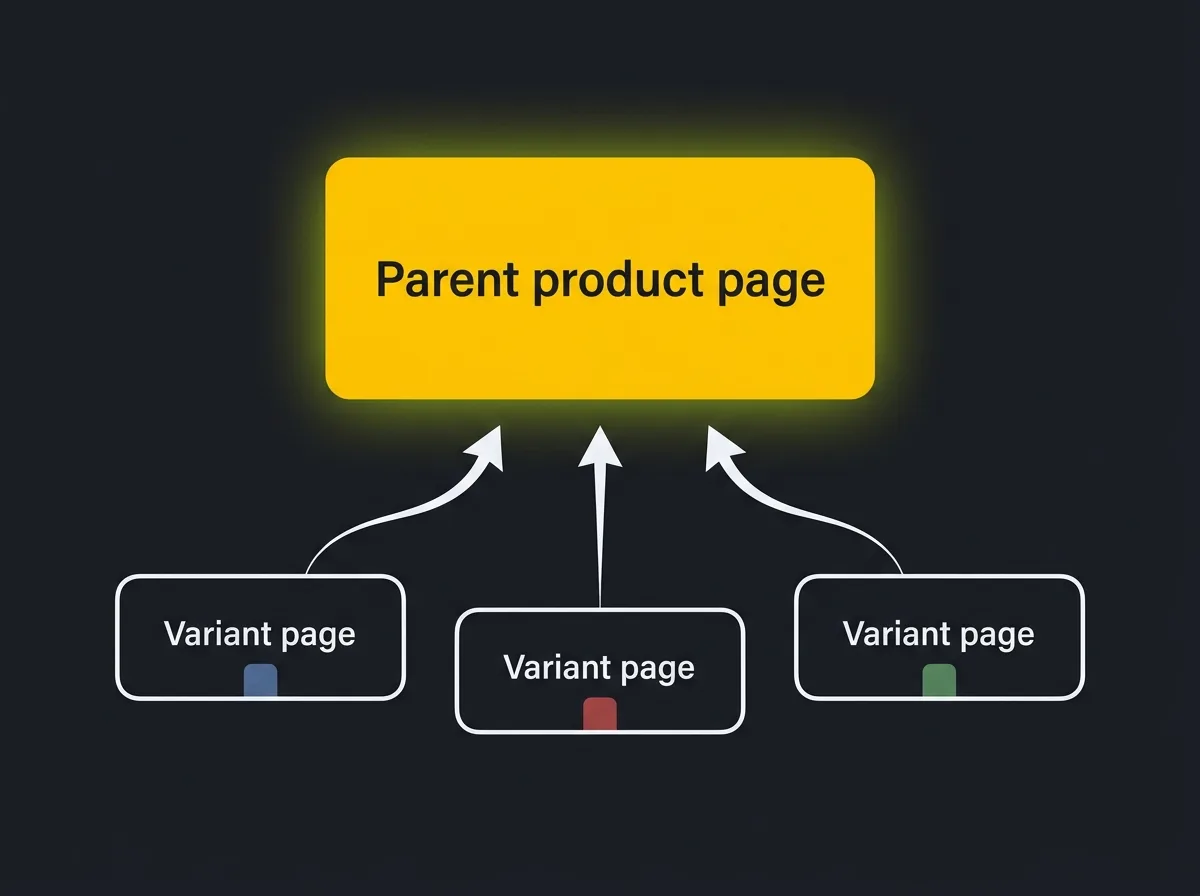
Duplicate content in ecommerce is almost never what people assume it is. It's not plagiarism. It's structural: three patterns that create near-identical pages Google cannot meaningfully distinguish between.
Product variants. A store selling a jacket in six colours often gives each colour its own URL. If each variant page uses the same product description, Google sees six pages with nearly identical content and no clear signal of which to index. The standard fix is canonical tags: each variant URL carries a canonical tag pointing to the parent product page. This tells Google "these pages exist, but treat this one as the primary version." It doesn't block crawling. It redirects indexing credit to the right place.
Manufacturer descriptions. A retailer using a supplier's standard product copy is publishing the same text as potentially dozens of other retailers selling identical products. Google has indexed that text many times already. It provides no differentiating signal for your store and contributes nothing to ranking potential. The audit checks the top 50 product pages by revenue for manufacturer copy and flags them for original content. Even 200 words of specific, useful, honest copy — the actual dimensions, honest comparisons with similar products, what existing buyers have said about it, what it pairs well with — is enough to differentiate and outperform the copied versions.
Paginated category pages. Page 2 of a product listing is a near-duplicate of page 1: same header, same footer, same editorial content, just a different slice of the grid. The audit checks whether paginated pages beyond page 1 are either noindexed or carrying canonical tags back to page 1. One or the other. Not both, and not neither.
A brief explanation of canonical tags, for anyone who hasn't encountered the term before: a canonical tag is a signal added to a page that says, in effect, "if you're choosing which version of this page to index, index this one." It doesn't prevent Google from crawling the other versions. It tells Google where to concentrate the link equity and ranking credit.
For variant pages and paginated results, it's standard handling and takes a developer about ten minutes per template to implement correctly.
The audit output for duplicate content is a list of affected URLs, grouped by type, with a severity rating based on the organic traffic those pages currently attract and the revenue attached to those product lines. This is where the prioritisation begins.
A canonical tag problem on your top 20 best-sellers is not the same priority as a pagination issue on a clearance section that generates minimal traffic and minimal revenue. The audit should make that distinction explicit.
Schema markup — what ecommerce stores need and why it now affects AI search too
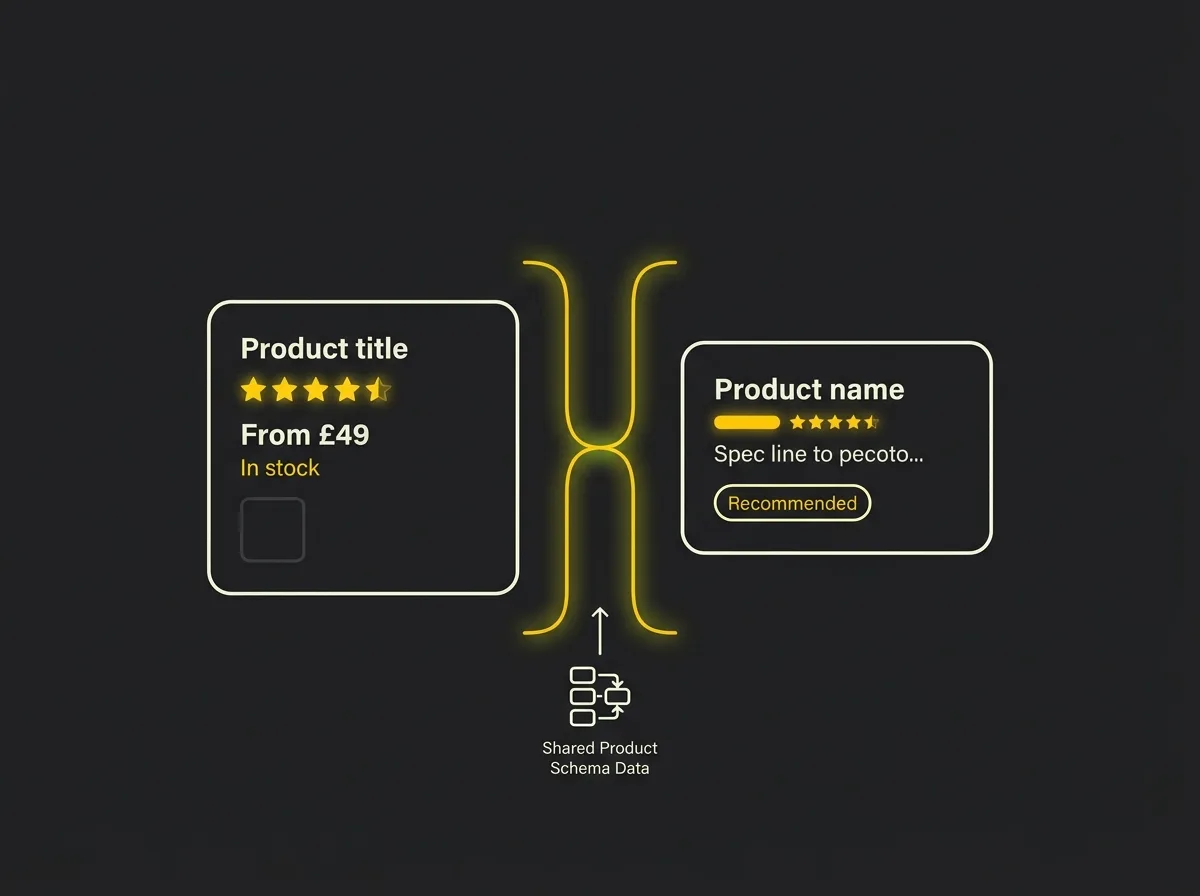
Schema markup is structured data: machine-readable information embedded in the page that tells search engines and AI shopping systems exactly what a page contains. For ecommerce, four schema types are commercially important.
Product schema is the foundation. It declares the product name, price, availability, currency, SKU, brand, and product image. Without complete Product schema, a store misses the price and availability rich results that appear in Google SERPs and improve click-through rates directly. It also misses eligibility for the enhanced listing formats in Google Shopping.
AggregateRating schema is often the single most valuable schema element a store can add. Star ratings appearing in search results improve click-through rate. Product pages carrying customer reviews that don't output AggregateRating schema are leaving this advantage unused, potentially across thousands of product pages.
That's a lot of lost clicks.
BreadcrumbList schema tells Google the navigation hierarchy of the site. It supports the breadcrumb trail that appears in search results and in AI search outputs, and helps Google understand the relationship between subcategories and their parent categories in a complex multi-level structure.
FAQ schema on category pages creates a rich result opportunity for common buyer questions: sizing, returns policy, delivery times, materials. These answers appearing directly in search results increase both visibility and the quality of the clicks. The readers who click after seeing the answer to their question are considerably more likely to buy than those who clicked to find out.
The AI search connection is where this becomes commercially urgent. Shopify's Commerce Trends research reports that orders from AI shopping surfaces are growing at 13 times the year-on-year rate.
AI shopping surfaces inside ChatGPT, Google AI Mode, and Perplexity pull product data directly from Product schema. Stores with complete schema attribute coverage — including price, availability, review aggregate, shipping information, and product images — are significantly more visible in these surfaces than stores with absent or partial schema. This is already measurable.
For the broader picture of how AI traffic behaves commercially and why its conversion profile differs from traditional search, the post on AI traffic and why it converts differently covers the commercial case in more detail.
What the schema audit checks: schema health across all product and category page templates using Google's Rich Results Test and the GSC rich results report; coverage errors where schema is present but invalid; coverage warnings where schema is present but incomplete; and systematic gaps where schema was added manually to a handful of pages during a previous site update but never applied to the full template.
Template-level schema gaps are the most common finding. A store that added AggregateRating schema to ten product pages during a site refresh two years ago and never applied it to the full catalogue is typical. One template change, and the impact is across the entire product range.
Worth knowing.
How to prioritise what the audit finds
A 200-item audit output is not an asset. It's an invitation to do nothing.
The value of an ecommerce SEO audit is not the completeness of the findings list. It's the prioritisation. Which issues are affecting your highest-revenue pages? Which fixes have template-level impact, applying once across hundreds or thousands of pages simultaneously? Which problems compound as the catalogue grows?
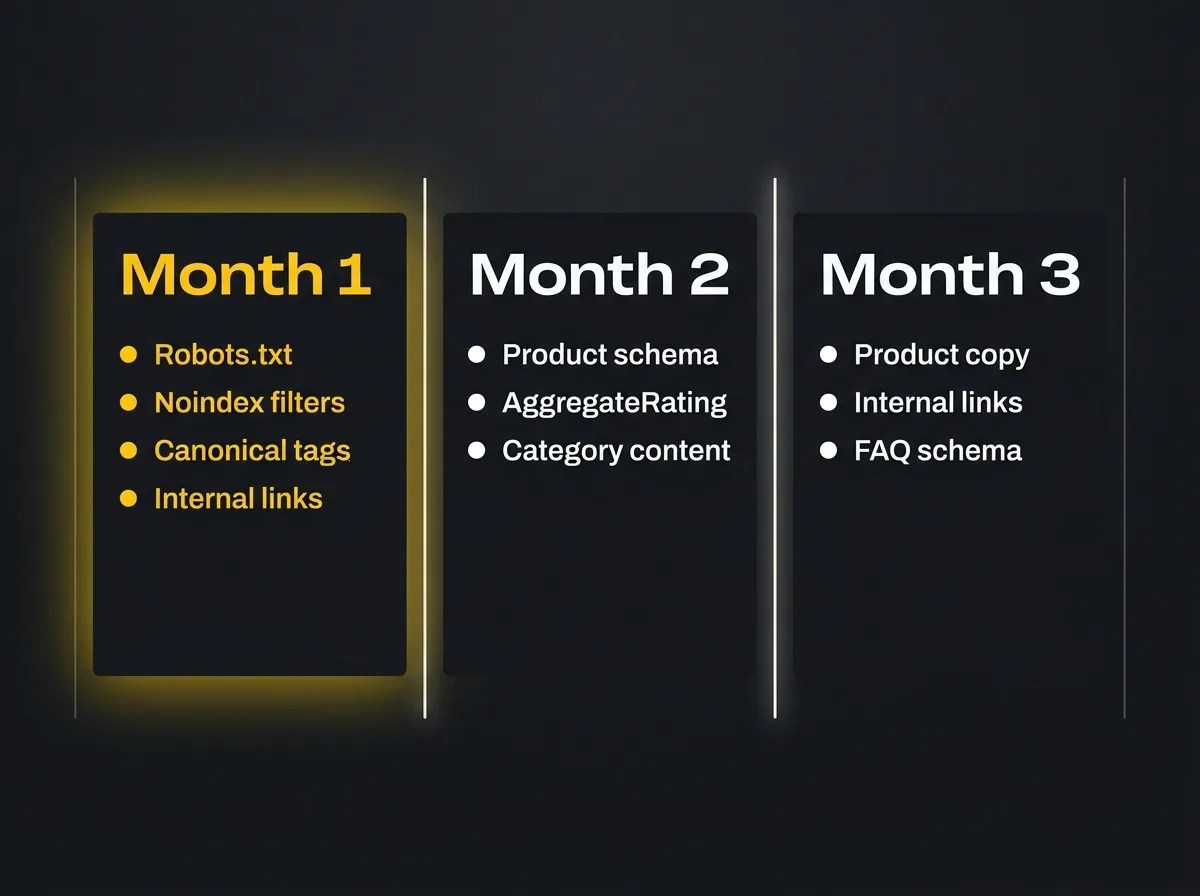
A practical sprint structure that works for most stores:
Sprint one (days 1 to 30): crawl and index fixes. Correct the robots.txt rules. Apply noindex directives to faceted parameter URLs. Fix canonical tags on product variant pages and paginated category results. This sprint is primarily development work. It stops the crawl waste that is almost certainly already happening and concentrates Google's attention on the pages that matter.
Sprint two (days 31 to 60): template-level fixes. Add complete Product schema across all product page templates. Apply AggregateRating schema wherever product reviews exist. Add BreadcrumbList schema to category and product templates. Reposition or write editorial content on the top 20 traffic-potential category pages. Template-level changes carry disproportionate impact because one fix applies to the entire catalogue simultaneously.
Sprint three (days 61 to 90): content and links. Rewrite manufacturer descriptions on the highest-revenue product lines. Build internal links from existing blog content to priority category pages. Add FAQ content and schema to the top category pages. This sprint is primarily content and editorial work, and it tends to have the longest lead time to measurable results — typically 60 to 120 days after implementation.
What a useful audit deliverable looks like: a specific finding for each issue, the URL or template affected, an estimated effort in developer or content hours, and an estimated impact on crawl efficiency, ranking potential, or click-through rate. Not a colour-coded traffic light grid. Not a 50-item checklist where every item carries the same priority rating.
The prioritisation logic is always the same: fix issues on the pages that generate revenue first.
A canonical tag problem on your top 20 best-sellers is not the same priority as missing meta descriptions on a discontinued product line. The audit should make that distinction explicit, not leave it as an exercise for whoever reads the report.
The scaling argument is worth restating here. Every structural problem you have today is proportionally larger once the catalogue grows, paid spend increases, or seasonal traffic arrives. Faceted navigation that wastes crawl budget on 800 products wastes proportionally more on 1,600. Duplicate manufacturer descriptions on 50 product lines become 100 when the new supplier range lands.
Fixing the structure before you scale is the difference between scaling revenue and scaling spend.
It compounds.
Before you commit to the next paid media push or catalogue expansion, it's worth knowing what the organic traffic gap actually looks like in numbers.
Free resource: Traffic Projection Report
Our Traffic Projection Report models what a store like yours could realistically achieve in organic sessions over 12 months, once the structural issues identified here are resolved and a content programme is in place. It's a practical baseline for the "do we fix this ourselves or bring someone in?" decision, and it takes about five minutes to complete.
If the answer is to bring in an ecommerce SEO agency, a well-scoped audit is the right starting point. It defines the work, the prioritisation, and the expected return before any ongoing commitment is made. For a broader view of what a search programme involves, the search visibility strategy page covers the full picture.
Frequently asked questions about ecommerce SEO audits
How often should I run an ecommerce SEO audit?
For a growing store, a full structural audit once a year is a sensible baseline, with lighter quarterly checks focusing on Google Search Console coverage data and schema health. If you are migrating platform, significantly expanding your catalogue, or planning a major increase in paid media spend, audit before you make the move. Structural problems compound when traffic volumes increase, so the timing of the audit matters as much as its frequency.
Can I do an ecommerce SEO audit myself, or do I need an agency?
You can do a significant amount of useful work yourself using free and low-cost tools. Google Search Console covers crawl errors, coverage gaps, and rich results health at no cost. Screaming Frog has a free version that crawls up to 500 URLs and surfaces duplicate content and redirect chains. Where an agency adds most value is in interpreting the findings, prioritising them against revenue impact, and running the fix programme at template level rather than page by page. A capable in-house team can handle the diagnostics; the prioritisation and execution are where professional experience pays for itself.
How long does an ecommerce SEO audit take?
For a store with 200 to 500 products, a thorough structural audit typically takes between 10 and 20 working days from kick-off to final report, assuming full access to Google Search Console and the ability to crawl the site. A larger catalogue with 1,000-plus products, multiple category levels, and complex faceted navigation will take longer. The report itself is only part of the work; building the fix roadmap and getting stakeholder agreement typically adds another week.
What is the difference between a technical SEO audit and an ecommerce SEO audit?
A technical SEO audit checks the foundations: robots.txt, sitemaps, page speed, Core Web Vitals, broken links, redirect chains, and HTTPS configuration. These checks apply to every website and are a useful starting point. An ecommerce SEO audit adds the catalogue-specific layer: crawl budget management, faceted navigation handling, product variant canonicalisation, manufacturer description duplication, category page content and URL structure, and schema markup coverage across product templates. The technical audit is a subset of the ecommerce audit, not a substitute for it.
How much does an ecommerce SEO audit cost in the UK?
For a store with 200 to 500 products, expect to pay between £1,500 and £5,000 for a thorough audit from an agency with genuine ecommerce experience, depending on the depth of the deliverable and whether it includes the fix roadmap alongside the findings. Very cheap audits — those under £500 — are usually automated report exports with no prioritisation or interpretation. The most useful question to ask when evaluating an audit quote is not "how many checks does it include?" It is "how will you tell me what to fix first?"